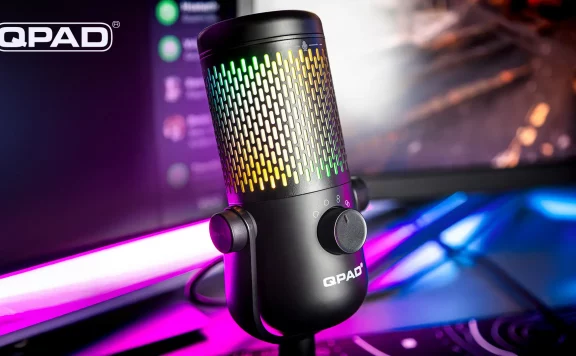
As a relatively recent addition to the Loot Level Chat podcast crew, and someone who’s never streamed before, I’ve never had any need or inclination to use a “proper” microphone. Usually the built-in mic on my gaming headset is enough, but after recording my first few episodes of the podcast I realised that wasn’t going to be enough as it left me sounding a bit tinny and quiet, so I jumped at the chance to take the QPAD Omnibeam RGB Pro microphone for a spin.
The setup was pleasingly simple for someone with zero experience like myself. It comes with a decent 3m USB-A to USB-C cable, and all you need to do is plug it in and it’s ready to go. The on-mic controls are equally simple, giving you complete control for your requirements without needing to faff about.
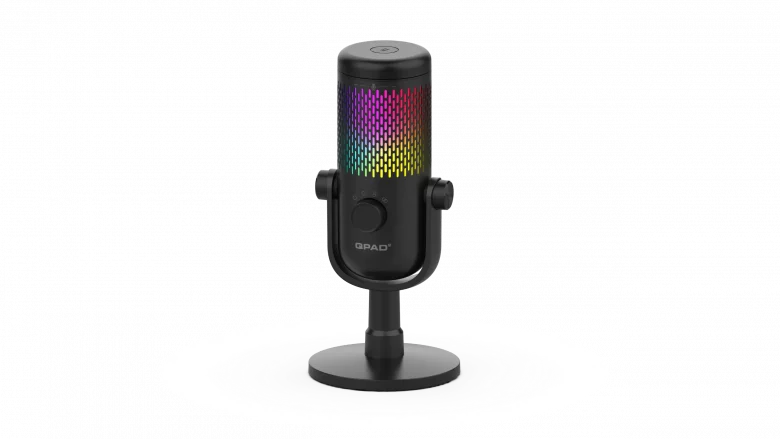
The dial on the front of the mic lets you set the microphone up for the recording layout you’re using. In my situation that simply means using the cardioid setting to minimise any background noise as I record, however there are options for stereo, bidirectional and omnidirectional for those who want to have back and forth conversations with two or more guests in the same room.
The controls for adjusting gain and muting yourself are equally intuitive. I’m not going to pretend I knew what gain was before recording the podcast, and if you listen to the GOTY podcasts you’ll hear I didn’t know how to use it then either, but there’s a dial around the top of the microphone that lets you adjust it. Simply crank it up and the mic will start picking up more of your audio, and the funky RGB lighting will flash green as you talk to let you know you’re in the right range. Talk too loud for the current gain though and it’ll let you know by changing to amber or even red. Muting yourself is a simple tap of a button on the top of the mic, although this can be a little fiddly at times.
I imagine most people will want to know what the audio quality is like. I’m not an expert but now that I know where to position the mic on my desk and how to use the gain adjuster, I’d describe it as “good”. I genuinely can’t say much more than that, but for the people who want to know specifics then here are some details from the website:
Studio-quality sound: 24-bit Hi-Res Audio with 14 mm condenser capsule
Recording patterns: Cardioid, Stereo, Omnidirectional & Bidirectional
Noise suppression: 90 kHz sampling rate & -35±3 dB sensitivity for clear sound
If you want to hear it in action then I recommend just listening to the latest episode of the Loot Level Chat podcast. It’s difficult to judge the recording quality of your own voice but I can compare it with the recordings from when I used a headset, as well as those where I use the QPAD before getting it set up and positioned properly and the difference is very noticeable to me.
Build quality is really solid, with both mic and base feeling much more premium than the low price point would suggest. The RGB lighting looks great and now that I know where to position it on my desk it’s become a permanent fixture, even becoming my go-to mic for Teams calls at work.
At £79.99, the QPAD Omnibeam RGB Pro microphone is great value, providing an entry level mic that’s easy to use, has plenty of flexibility and sounds pretty damn good too.